Best resume formats for 2026: A complete guide for every career stage
We get it — resumes can feel stressful. If you are applying for your first job, you might wonder: “How do I stand out with no experience?” And if you are a seasoned professional, your challenge flips: “How do I pack years of professional experience into two sharp pages that don’t bore hiring managers?” The answer lies in choosing the best resume format and then surfing for the right professional resume templates or (even creative resume templates if you like!).
In 2026, recruiters care as much about how clearly and confidently you tell your story as they do about your degrees and experience. This guide will walk you through picking the right resume format for your career stage and making it ATS-friendly (optimised for applicant tracking systems). You will also see resume examples and resume samples — basically everything most job seekers need to land interviews today.
Table of Contents
1. Why choosing the right resume format matters in 20262. Choosing the right resume format for your career stage
3. Resume formatting tips to stay ATS-compatible in 2026
4. Modern resume trends to follow in 2026
5. Resume formatting checklist (quick scan before you send)
6. Common resume formatting mistakes you should avoid
Once your professional resume is ready, the next question is: where do you take it? That is where MyCareernet can help. From thousands of job openings to career path events and hiring contests, it gives you a stage to showcase your skills and land the opportunities you deserve.
Why choosing the right resume format matters in 2026
In 2026 and beyond, your resume is more than a curriculum vitae; it is your digital handshake. And just like a limp handshake can leave a poor impression, an ill-formatted resume can sabotage a great application.
For freshers, the right resume format for job interview is a confidence booster. It shifts the spotlight from “what you do not have” to “what you can bring to the table”, helping you look job-ready even with limited work history.
For experienced professionals, it keeps your achievements from getting lost in a wall of text, highlighting growth, impact, career progression clearly.
But no matter your experience level, your resume faces two filters:
- First, the Applicant Tracking Systems screen for keywords, section headers, and clean formatting. If it fails this test, no human will see your resume.
- Then come the recruiters or hiring managers, who spend barely 6–8 seconds scanning before deciding whether to read further.
That is why selecting the right professional resume format is so crucial today. But you will not find it by simply copying a traditional resume template — you need a structured format that presents your journey clearly and makes recruiters pause and think: “This one looks promising.”
And what does that structure look like in practice? It depends on where you are in your career.
Choosing the right resume format for your career stage
Instead of memorising multiple styles, think of resume templates as tools. Choose your preferred format based on your career stage:
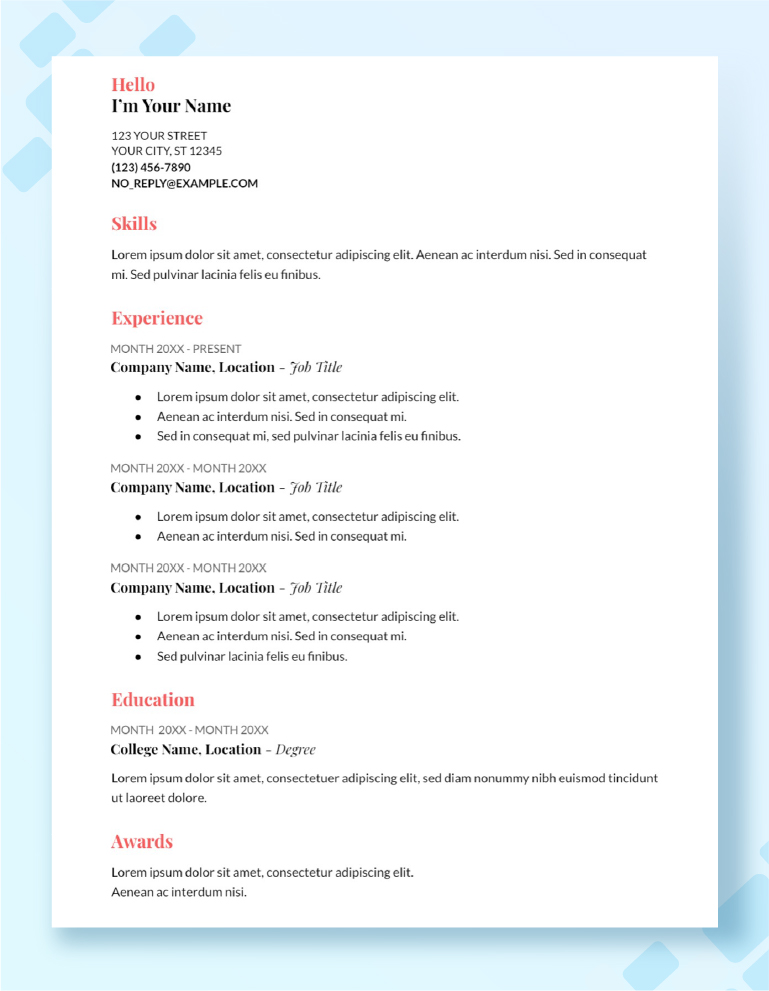
1. Chronological resume
- How it works: The reverse chronological format (aka a reverse chronological resume) lists your roles backwards, starting with the most recent and showing career history and growth
- Why it works in 2026: Recruiters still prefer clarity above all else; this format lays out your career growth step by step, making it effortless to connect the dots
- Ideal for: Experienced professionals with consistent work history and clear job titles or career goals
✍️Writing tip: Instead of “Software Engineer – worked on product features”, try:
“Software Engineer (2019–2026): Grew from writing individual modules to leading a 10-member backend team, delivering 3 product launches in 2 years”.
2. Functional resume
- How it works: Spotlights key skills, academic projects, personal projects, and relevant experiences first, with job history placed later
- Why it works in 2026: In a market where practical ability often matters more than job titles, the functional resume format lets your strengths lead the way
- Ideal for: Freshers, career changers, recent graduates, entry level professionals, or those with employment gaps
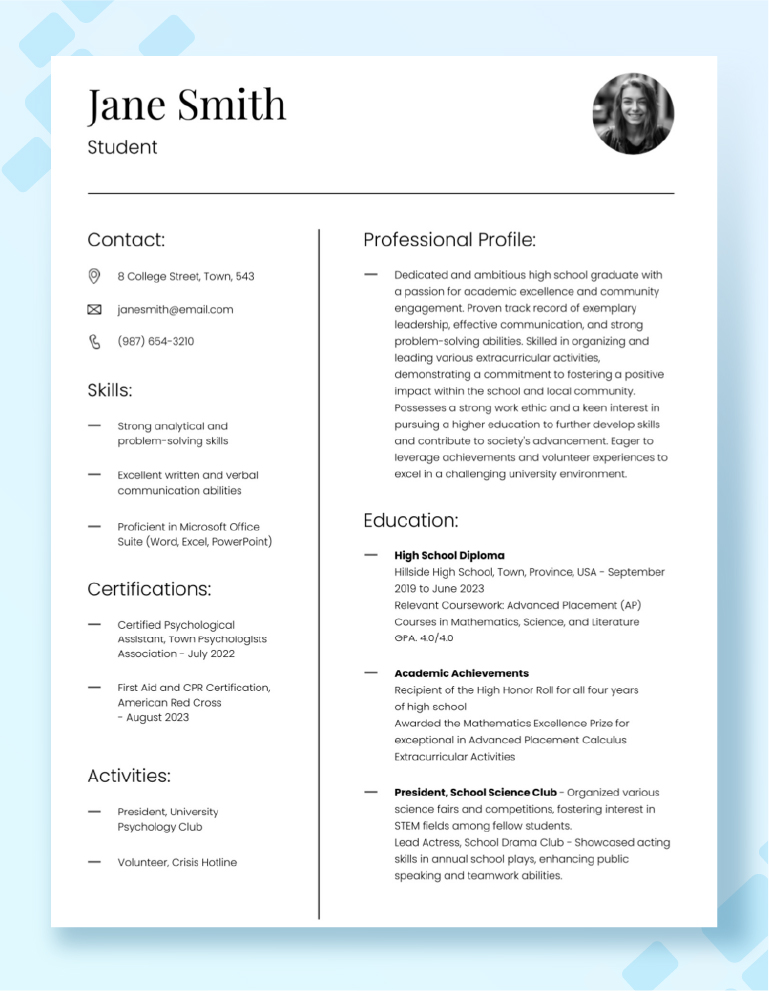
Recruiters scanning functional resumes are looking for signals of potential: hands-on persona; projects, hackathons, certifications, internships, or self-initiated work that prove you can apply transferable skills to real problems. A well-crafted functional resume format shifts focus from “experience you lack” to “value you bring.”
In a nutshell, if you have ever wondered which resume format is the best for freshers, this is it.
✍️Writing tip: Instead of “Final-year project on AI,” write:
“Built an AI chatbot using NLP that handled 200+ student queries during testing, cutting average response time by 50%”.
If you are a fresher, you can also use a crisp resume summary or career objective for your resume to set the tone, focussing on what you can offer rather than what you potentially lack.
3. Hybrid resume
- How it works: Also known as a combination resume format, hybrid resumes merge the clarity of a reverse chronological order with the flexibility of a functional format; the candidate’s skills and achievements take the lead, supported by a concise work history for credibility
- Why it works in 2026: Recruiters want both proof of capability and context; this structured format delivers balance — it highlights transferable skills while still showing where you have applied them
- Ideal for:
- Freshers with internships, projects, or volunteer work that show early industry exposure
- Creative professionals changing careers, or someone starting a new career path and needing to showcase adaptable skills
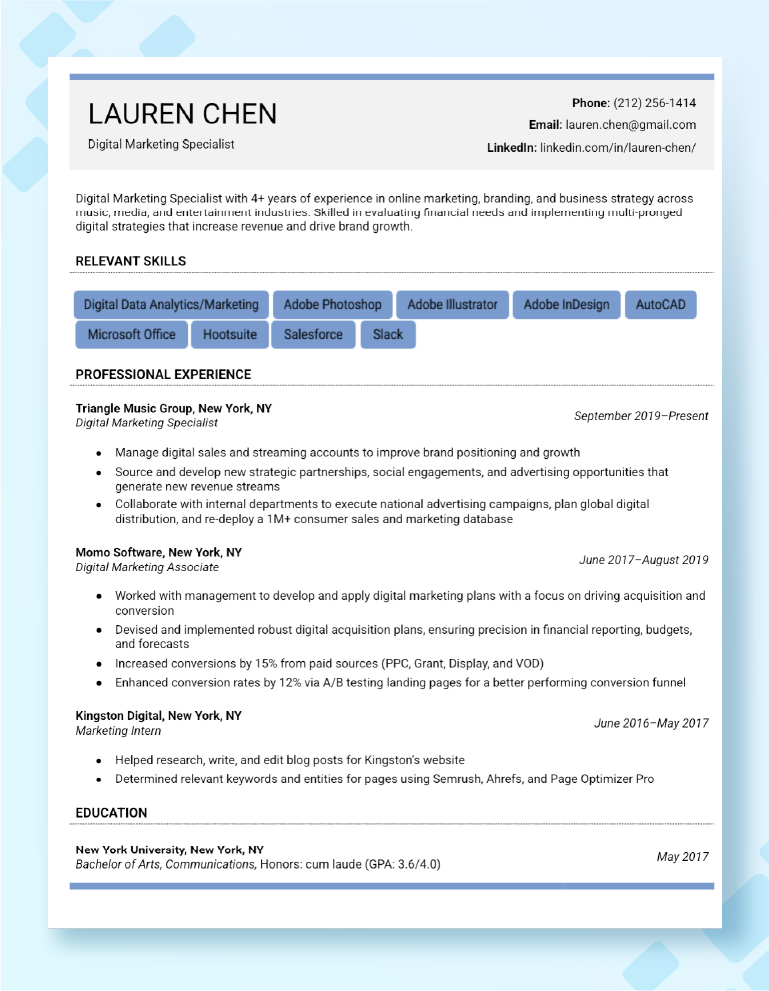
A strong hybrid resume tells a story of adaptability. Aside from listing what you have done, it shows how your relevant skills are applicable to the target job, making the leap between past experience and future potential seamless.
✍️Writing tips:
Freshers, try this:
“Marketing Intern at XYZ Startup – Designed and executed a social media campaign that boosted engagement by 25% in three weeks; collaborated with the product team to align messaging with launches.”
Career shifters, consider this:
“Software developer with 8 years in fintech, transitioning into cybersecurity. Certified in CompTIA Security+; built penetration testing projects that identified and fixed 30+ security gaps in sandbox environments.”
Quick comparison of resume formats (2026)
| Resume format | Best for | Pros | Cons | ATS-friendly? |
|---|---|---|---|---|
| Chronological | Experienced professionals with steady work history | Easy to read, shows career progression clearly | Highlights employment gaps | ✅ Yes |
| Functional | Freshers, students, career changers | Emphasises key skills and projects over jobs | Can look vague if not backed by evidence | ⚠️ Sometimes (must be simple) |
| Hybrid/Combination | Freshers with internships; experienced professionals shifting careers | Balanced: shows transferable skills + work history | Can get cluttered if not well-structured | ✅ Yes |
| ATS Resume Format | Anyone applying online | Optimised for job description keywords, clear structure, including a resume header | May feel “plain” without design | ✅ Designed for ATS |
However, choosing the right format is just half the battle. The real test comes when your resume faces the ATS — the digital filter standing between you and the recruiter.
Resume formatting tips to stay ATS-compatible in 2026
A design that looks sleek apparently, might appear unreadable to the application tracking systems. That is why a polished resume structure matters as much as content in 2026. Keep these guardrails handy to have a stylish resume without confusing ATS:
- Use clean, single-column layouts: ATS struggles with multi-column designs and often scrambles the text
- Stick to safe fonts (Calibri, Arial, Times New Roman, Georgia): Decorative fonts may not be recognised, leading to missing information
- Follow standard section headers (Contact > Summary > Skills > Experience > Education > Certifications): ATS looks for exact header labels to categorise your details correctly
- Avoid graphics, tables, icons, or unusual symbols: Most systems cannot parse them, so your content may vanish altogether
- Mirror keywords from the job description: Exact matches (e.g., “Digital Marketing Strategy” vs. “Online Campaigns”) increase your chance of being shortlisted
- Save as PDF unless otherwise specified: PDFs preserve formatting across devices, but check if the portal requires Word
- Use consistent date formats (MM/YYYY or DD/MM/YYYY): Helps ATS read timelines without confusion
- Include white space generously: Makes your resume easier for both ATS parsing and human skimming
- Name your file smartly (FirstName_LastName_Resume_2025): Recruiters often download hundreds of resumes — a clear filename helps yours stand out
⚡ Pro Tip: For an ATS-friendly template, use a general resume builder or an AI resume builder to generate a professional template. If you are in a creative field, link your Behance/portfolio instead of stuffing visuals.
If you want a detailed step-by-step guide, check out how to write an ATS resume online to make sure your application never gets filtered out.
Great — your resume has cleared the ATS hurdle! But now that it is in human hands, it needs to feel fresh, relevant, and professional. That is where modern resume trends come in, helping you stand out in 2026 while keeping your presentation polished and effective
Modern resume trends to follow in 2026
Recruiters today are busier than ever. To them, what makes a resume feel “modern” is not just how it looks, but how it connects. Consider adding these elements to your document:
- Interactive add-ons (portfolios, videos, or project demos): Embedding links to a quick case study video or a live project can set you apart instantly
- Skills snapshots (quick-glance skill bars or matrices): A compact “Core Skills” grid makes it easier for recruiters to see your strengths in a glance
- Future skills (show readiness for tomorrow): Adding certifications or courses in AI, data, or sustainability signals you are adapting to what is next
- Hybrid identities (blending tech + domain): Recruiters love candidates who connect two worlds, e.g., “Finance professional with expertise in Python and predictive analytics”
- Personalisation (subtle tailoring cues): Use role-specific language (like “go-to-market strategy” for marketing roles or “zero-downtime deployments” for DevOps) to show you speak the recruiter’s language
- Add context, not just links: When you include a link to your cover letter templates or portfolio, frame it with a one-line hook (your best campaigns, your cleanest code, your biggest wins); this turns a bare link into an invitation to explore your work
Modern resume templates help you express your personal style while keeping an easy-to-read layout. You can start free with Google Docs resume templates, or download CV templates or free resume templates online.
But while trends inspire your resume and keep it fresh, before you hit “send”, it helps to pause for a quick sense-check.
Be it a fresher resume format for job interview or a good resume format for experienced professionals, a modern template still needs the basics in place.
Resume formatting checklist (quick scan before you send)
Think of this as a pre-flight safety scan — making sure your job-winning resume is polished, professional, and recruiter-ready. If you are wondering, “What should I check before sending my resume in 2026?” — this is your answer:
- Keep it concise (aka “how many pages?”): One-page resume templates for freshers, two pages max for experienced professionals
- Maintain consistent formatting: Use the same font, size, and style for section headings throughout
- Use action verbs: “Led”, “Designed”, “Increased” work better than “Responsible for”
- Skip personal details: Leave out marital status, religion, or other irrelevant info (these can even be legally sensitive in some regions)
- Name your file right: Save as Firstname_Lastname_Resume.pdf (not resume_final2.pdf)
- Check contact details: Use a professional email, updated phone number, and LinkedIn URL
- Test mobile readability: Recruiters often view resumes on phones; cluttered PDFs will not cut it
- Align dates carefully: Ensure employment dates are accurate, with no unexplained gaps or overlaps
- Proof before sending: Eliminate typos, tense shifts, and extra spaces; read it aloud once
- Run an ATS check: Copy-paste into plain text; if it looks scrambled, simplify formatting
Once you have scanned your draft against this checklist, you can download free, customizable resume templates available online to save time and ensure your format is recruiter-ready.
🧠 Example: Instead of saying “We had a conflict, but I solved it by communicating better,” try “In a project delay (Situation), my role was to realign the team (Task). I initiated a daily 15-minute stand-up (Action), which cut miscommunication and reduced delays by 20% (Result).”
And remember, your answers do not need to sound perfect. They need to sound real and flow like a conversation.
Common resume formatting mistakes you should avoid
Even the best resume template can fall flat if small mistakes creep in. Avoiding these common slip-ups will keep your resume stands sharp, impactful, and interview-ready:
- Overloading with graphics or colours: Too many visuals distract recruiters and can confuse ATS parsing
- Overstuffing with keywords: While keywords are important for ATS, excessive stuffing can make your resume unnatural; integrate them naturally within achievements/relevant skills
- Neglecting section hierarchy: Recruiters skim resumes in seconds; if you list skills or achievements way below, your strengths may be missed
- Overloading on buzzwords: Words like “synergised” or “go-getter” do not convey measurable impact; focus on concrete achievements instead
- Using outdated jargon: Stick to current industry terms; old terminology can make skills look obsolete
- Neglecting soft skill proof: Do not only list traits like “leadership” or “team player”; show them in context with examples
- Ignoring cultural fit signals: Subtle hints in phrasing or projects that resonate with company values can make a difference
- Having File size issues: Large PDFs with embedded images or tables may fail to upload or load slowly in ATS systems
- Not having clarity on your story: Clearly state how many roles you have held, your job-search focus, and your career goals so recruiters instantly understand where you fit
All said and done, formatting is only one part of the puzzle. If you are starting from scratch and need guidance on structure, tone, and content, do check out online guides on how to write a resume.
Amp up your resume formatting skills with MyCareernet
Your resume is the first impression that opens doors. Choose professional yet simple resume templates that highlight your strengths, keep ATS filters happy, and make recruiters pause long enough to see your value.
You can sign up on MyCareernet for free and put your best resume format to work — through thousands of jobs, hiring contests, and curated career events that connect your preparation with performance.
Frequently asked questions on resume formats
The chronological resume format is the most widely used and recommended for securing interviews. It highlights your work experience in reverse chronological order, making it easy for recruiters to see career progression. For career changers or those with gaps, a functional or hybrid resume can also be effective.
Both approaches work, but using a reputable resume builder can save time, ensure a clean design, and improve ATS compatibility. Manual creation allows customisation and creative layouts, which can help if you are applying for design or creative roles. The key is clarity, readability, and ATS-friendly structure.
Single-column resumes are safer and more ATS-friendly, as most applicant tracking systems prefer a simple, linear structure. Double-column layouts can look visually appealing but may confuse ATS parsing, especially for older systems. Use double columns only for creative industries where design matters.
Simple, reverse-chronological resumes with standard headings (Experience, Education, Skills) are the most ATS-compatible. Avoid graphics, tables, and unusual fonts. A clean .docx or PDF format with clear section titles improves parsing and keyword recognition.
- Corporate/Finance/Tech roles: Chronological or hybrid resumes that focus on measurable achievements.
- Creative roles (Design, Marketing, Media): Functional or visually appealing resumes that showcase skills and portfolios.
- Entry-level candidates: Chronological resumes emphasising internships, projects, and education.
Yes. While all resumes should be clear, concise, and ATS-friendly, creative industries allow more design freedom, whereas corporate, finance, and tech sectors prioritise structure, quantifiable achievements, and keyword optimisation. Always tailor your resume format to industry standards and role requirements.

MyCareernet
Author
MyCareernet brings expert insights and tips to help job seekers crack interviews and grow their careers.